

Editorial Note: We may earn a commission through links from our partners. American Express is an advertiser on The Military Wallet. Commissions do not affect our editors’ opinions or evaluations. Terms Apply to American Express benefits and offers.
Table of Contents
- Why You Need a Credit Card
- How Many Credit Cards Should You Have?
- How to Choose the Right Credit Card
- What You Should Know About Credit Cards
- Tips on Finding the Best Credit Cards
- Search the Following Credit Card Categories for More Great Credit Cards
- Cash Back Credit Cards
- Balance Transfer Credit Cards
- 0% APR Credit Cards
- Rewards Credit Cards
- Low Interest Credit Cards
- Travel Rewards Credit Cards
- Airline Miles Credit Cards
- Gas Rewards Credit Card
- Business Credit Cards
- Student Credit Cards
- Secured Credit Cards
- Credit Card Bonus Offers
- Other Credit Card Offers
It can seem like a complicated process if you’ve never applied for a credit card before.
There are all kinds of card offers available, each with its own features, benefits, and costs.
And since there are so many different banks offering credit cards, each with its own qualification requirements, knowing how to apply for a card can seem like an educated guess.
But in this beginner’s guide to credit cards, we’re going to try to take some of the mystery out of the process and connect you with the best cards for your needs.
Credit Cards by Category
Looking for a quick list? Learn more and compare ratings of cards based on what credit card feature is the most important to you.
For a more extensive review of the ins and outs of credit cards, and the top card categories, keep reading below.
Our Overall Top Pick – The Platinum Card® from American Express
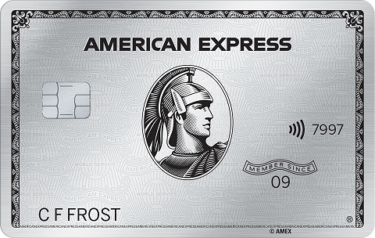
American Express offers one of the best money-saving perks to military servicemembers – it waives the annual fees for its credit cards, including on The Platinum Card® and the American Express® Gold Card.
With an annual fee of $695 and $250 respectively, it’s easy to see how this under-the-radar perk can be a huge money saver for American Express cardholders, especially if you’re a service member who wants to enjoy the lucrative luxury perks that accompany The Platinum Card® from American Express, or the everyday practicality of the American Express® Gold Card.
Now that you know you can get your American Express annual fee waived as an active service member or spouse of a service member, what are some American Express cards to check out?
Learn more about our favorite below:
Why You Need a Credit Card
It’s almost impossible to enjoy complete financial freedom in the 21st century without a credit card.
You can use one for everyday purchases, including online shopping. Some merchants even require a credit card, such as car rental companies, and increasingly, hotels.
Yes, you can use a debit card or even a prepaid card in a similar fashion. But they both lack the purchase protections offered by credit cards.
For example, credit cards typically offer $0 liability for unauthorized transactions. That will protect you from fraudulent charges. Most also come with some sort of purchase protection, allowing you to chargeback a purchase if you’re not satisfied with it.
They also come with a wide range of benefits, including generous upfront bonuses, ongoing spending rewards, collision damage waiver on car rentals, and often no foreign transaction fees on international purchases.
But perhaps the most important benefit of a credit card is its ability to help you build a strong credit score.
Neither a debit card nor a prepaid card can help you with that. But once you get the first credit card, your payment history will be reported by the lender to the three major credit repositories – TransUnion, Experian, and Equifax.
Compare the rates, fees, and rewards of top credit cards for military servicemembers and veterans, including cards with waived annual fees under the SCRA.
How Many Credit Cards Should You Have?
For this reason, a good strategy is to work toward having at least three or four credit cards. That will give you enough credit references to give you a strong credit score, which in turn will give you access to the best credit card deals.
You should also refrain from canceling your credit cards. Keeping your credit cards open can lengthen your credit history and boost your score. On the flip side, canceling your credit card will lower the average age of your active credit lines, which can negatively impact your score.
It’s important to note that not all credit cards are created equal, so while you should aim to have at least three or four credit cards, you’ll want to make sure you’re carrying the right cards.
These are four of the most recommended cards among military finance community experts:

Chase Sapphire Reserve®
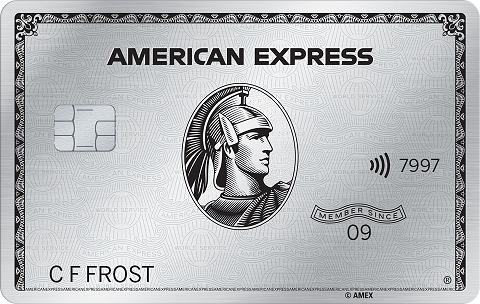
The Platinum Card® from American Express
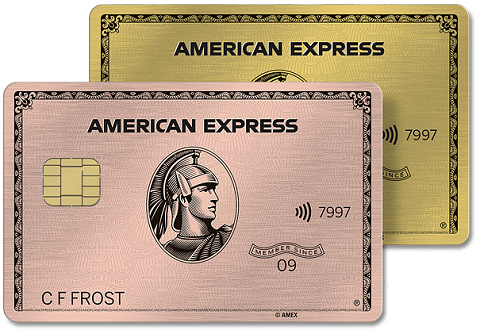
American Express® Gold Card
Chase Freedom Unlimited®
How to Choose the Right Credit Card
Naturally, the first consideration with any credit card is the state of your credit. If you have excellent credit, including a credit score well above 700, you’ll have your choice of cards.
In fact, you’re probably already being solicited with multiple offers.
Choose a Card That Works for You
In selecting a card, choose the one that best matches your preferences and spending patterns. For example, if you’re a frequent traveler, you may want to favor a travel rewards card.
If you’re not, a cash back rewards card will be the better choice. No matter what your forte, there’s a world of credit card rewards programs.
And of course, if you’re looking to get out of a high-interest credit card situation, a balance transfer card – preferably one with a very long 0% introductory term – will be a major consideration.
Maybe you’re a business owner. If so, you definitely need a business credit card.
If you have credit problems, or you’re looking for a good beginner card, consider credit builder cards, either secured or unsecured.
But if you’re a student with very limited credit, you should start with student credit cards, since they can often accommodate a lack of credit. You can also boost your credit by becoming an authorized user on a family member or friend’s credit card account.
What You Should Know About Credit Cards
We’ve been discussing the benefits of credit cards up to this point, but there are also responsibilities.
Payments. As is the case with any type of lending arrangement, you’ll be required to make monthly payments. Credit cards set minimum payments, usually between 2% and 3% of the balance owed. But if you make the minimum payments only, it can take several years to pay off your balance. The larger the payments, the lower your balance, and the less you’ll pay in interest.
Interest. Interest rates on credit cards are extremely high compared to other types of loans. While you may be able to get auto loans or home loans in the 4% to 5% range, interest on credit cards usually runs between 15% and 25%, or even higher.
Grace period. Credit cards typically come with a grace period. Interest won’t be charged on a purchase that’s paid within a certain amount of time, usually 25 to 30 days. Any balance remaining after that time will be subject to interest.
Fees. Many credit cards charge an annual fee, though it’s typically below $100. Also, be aware of late fees and over-limit fees. These typically are between $35 and $45 and will be imposed if you’re even one day late on your payment, or $1 over on your credit limit.
Aim to pay your balance in full each month. If a credit card charges an interest rate of 24%, you’ll be paying 2% of your balance each month in interest. On a $5,000 balance, that will be $100. Even if a card comes with very generous rewards, it can easily be offset by the interest expense.
Look out for credit card fraud. Credit cards and identities get stolen every day, so it’s important to closely monitor your account. In the case of credit card fraud, you need to report your stolen card to protect your account.
Tips on Finding the Best Credit Cards
Finding the best credit card isn’t always as easy as it seems. Credit cards come with a matrix of guidelines, restrictions, qualification requirements, and benefits. You’ll have to look closely at these to weigh out which card will be best for you.
There are many types of credit card users out there. Which type of card you get depends on how you plan to use it. Here are a few considerations to keep in mind.
Your credit. If your credit is insufficient to get the type of card you want, you’ll need to work on improving it. That may require paying off any past due balances, paying down existing credit card balances, or disputing any derogatory information that may be in error. Raising your credit score by just 20 or 30 points can make a big difference in the type of card you’ll get.
Look past temporary benefits. If you’re considering a card for its signup bonus or an attractive 0% introductory offer, don’t ignore the regular interest rate on the card. These offers are temporary, but regular interest rates are what you’ll be dealing with once those benefits expire. If the rate on a new card is higher than your current card, it may not be worth the temporary benefits it provides.
Annual fee vs. no fee. Some cards charge no annual fee, but that doesn’t necessarily mean they’re a better deal. For example, if a card that charges an annual fee has more generous rewards, it may be better than a fee-free card.
Application: If you attempt to apply for several credit cards at once, it could hurt your credit score. It’s better to do plenty of research and narrow your applications down to just one or two cards that will work best for you.
With that advice in mind, take a look at all the different types of credit cards and find more info in our in-depth reviews of each.
Then, you can check out the best credit card companies to get the right one.
Search the Following Credit Card Categories for More Great Credit Cards
There are many types of credit cards to meet your spending needs. I pay my credit card balance in full each month, so I prefer to use a credit card that offers rewards. I rotate my spending with a cash back credit card and a travel rewards credit card, depending on which offers the best rewards for the specific purchase.
However, you may find that your spending habits warrant a different type of credit card, such as a low-interest credit card, a balance transfer credit card, a small business credit card, one that offers hotel or airline rewards, a student credit card, or something else.
The following categories should help you find the right credit card for your needs.
Cash Back Credit Cards
Cash back credit cards are my favorite type of rewards because they are generally the easiest to understand and use. They pay you back based on the dollars you spend on your everyday purchases. The cards in this list offer a variety of cash rewards programs that will allow you to maximize your rewards.
Who are these cards for? Anyone looking to earn cash back on everyday purchases, including gas, groceries, eating out, travel, or a mix and then some.
Balance Transfer Credit Cards
Are you in credit card debt? Try transferring your credit card balance to a 0% balance transfer card and avoid paying interest on your credit card debt. This is a great way to save hundreds or even thousands of dollars in credit card interest.
Who are these cards for? Anyone seeking to get out of debt as quickly as possible.
0% APR Credit Cards
These 0% credit cards come with 0% interest on purchases and/or balance transfers for the first few months you own the card, making them a great way to pay off your credit card balance more quickly or to get an interest free loan! Many of these credit cards also feature an attractive rewards program.
Who are these cards for? Anyone looking to pay off their credit cards more quickly or get an interest-free loan.
Rewards Credit Cards
These cards offer a variety of cash, travel, and points rewards. The rewards cards on this page focus on finding the best overall rewards. Find the card that will earn you the best rewards for your needs!
Who are these cards for? Anyone looking to capitalize on their normal spending.
Low Interest Credit Cards
Do you carry a balance on your credit card? If the answer is yes, then you should use a credit card that features a low everyday interest rate. Choose one of these low interest credit cards to save money!
Who are these cards for? Anyone who carries a credit card balance.
Travel Rewards Credit Cards
These are some featured cards for traveler’s, offering cardholders a way to earn cash and travel rewards, free airline tickets, free hotel stays, and more.
Who are these cards for? Frequent fliers, travelers, and anyone looking for the most value in their credit card rewards.
Airline Miles Credit Cards
These cards are great if you are a loyal or frequent airline traveler. Sign up bonuses include free airline tickets and cash back, plus you can earn free tickets, first class or business class upgrades, and more.
Who are these cards for? Frequent fliers who favor a specific airline.
Gas Rewards Credit Card
Do you drive a lot? Then you can save a substantial amount of money on gas with these gas rewards credit cards.
Who are these cards for? Anyone who spends a lot of time on the road and wants to earn cash or other rewards for their troubles!
Business Credit Cards
Every business owner should think about getting a business credit card. I use mine frequently for business expenses and enjoy the protections credit cards offer as well as cash back and rewards.
Who are these cards for? Small business owners who are seeking to simplify their finances, grant employees access to a credit card, or simply earn rewards on their regular business expenses.
Student Credit Cards
Student credit cards give young people the opportunity to build their credit history and credit score at an early age. Student credit cards also give young people the opportunity to learn responsible credit card use and earn rewards such as cash back, points, and more.
Who are these cards for? Students and younger people looking to establish their credit and build a credit profile.
Secured Credit Cards
Don’t have a credit history, or do you have bad credit? Secured credit cards can help you build or repair your credit score and still enjoy the benefits, conveniences, and protections of having a credit card. If your credit is not great but not terrible you might want to try credit card offers for fair credit first.
Who are these cards for? Anyone who needs to build or re-establish their credit history.
Credit Card Bonus Offers
These featured sign-up offers allow you to earn anywhere from $100 and up, just for opening a new credit card and meeting a minimum spending requirement. Easy!
Who are these cards for? Anyone looking to capitalize on credit card rewards.
Other Credit Card Offers
Looking for other credit card offers? The following section of our site includes information about credit cards, including special offers, individual credit card reviews, credit card category reviews, cards for bad credit, credit cards for those with fair credit scores, and more great credit card offers.
The Military Wallet has partnered with CardRatings for our coverage of credit card products. The Military Wallet and CardRatings may receive a commission from card issuers. Some or all of the card offers that appear on The Military Wallet are from advertisers. Compensation may impact how and where card products appear, but does not affect our editors’ opinions or evaluations. The Military Wallet does not include all card companies or all available card offers.
About Post Author








Comments:
About the comments on this site:
These responses are not provided or commissioned by the bank advertiser. Responses have not been reviewed, approved or otherwise endorsed by the bank advertiser. It is not the bank advertiser’s responsibility to ensure all posts and/or questions are answered.
Shea Curry says
Ryan,
I’m just over a year out from ETSing from the Army and I’m thinking about getting an AMEX Platinum Card before I get out to take advantage of the annual fee waiver program.
Do you know if you get the card while on AD and then ETS, if you are grandfathered in to the fee waiver – or if they offer to waive the fee for a year or two after ETS?
It doesn’t make sense to me to get this card now, if I’m getting out in just over a year. However, I would strongly consider it if the annual fees were waived after I ETS – even if only for another year or two!
Thanks in advance for your time and consideration!
– Shea
Ryan Guina says
Hello Shea,
My experience is that American Express will waive the annual fee while you still serve on active duty. However, when you leave active duty, they will notify you in writing that you must pay the fee when the card is due for renewal. At that point, you can choose to keep the account open and pay the renewal fee, downgrade it to a card with a lower annual fee or no annual fee, or cancel the card.
For example, if you open the card in March, the annual renewal would be in March of the following year.
Let’s suppose you were due to ETS in April. If you open the card in March, you will be able to keep the card open through March of the following year, at which time you need to decide whether to renew, downgrade, or cancel. In that situation, you would have the card for almost an entire year without paying the fee. If you know you are going to ETS in April of the following year, then you could open the account in March of this year and get roughly two years of fee waivers before you decide whether to renew, downgrade, or cancel. I hope this is helpful!